
Reading independently
Difficulty reading can be one of the most frustrating impacts of sight loss. Everyday things like letters, recipes, books or information on your phone screen can suddenly become hard work.
The good news is that there are lots of ways to keep reading independently. Different tools work for different people, and many people use a combination rather than relying on just one solution.
This page gives an overview of the main options and helps you think about what might work for you.
Using magnification
For many people, magnification is the first step.
Optical magnifiers come in many shapes and strengths. Some are small and portable for use when you are out and about, while others are designed to sit on a table or rest against your chest at home. Some include built-in lighting, which can make text clearer and reduce glare.
Stronger magnification can make print easier to see, but it also reduces how much text you can see at once. This can feel tiring or frustrating for longer reading.
Electronic magnification
If you need higher levels of magnification, electronic magnifiers can be helpful.
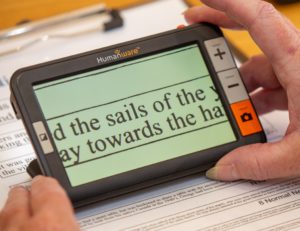
These devices use a camera to show text on a screen, often in high contrast colour combinations such as black on white or yellow on black. The larger screen can make it easier to follow lines of text and read for longer.
Electronic magnifiers range from small handheld devices to larger desktop systems. They can be very effective, but they can also be expensive, so it’s usually a good idea to try equipment before buying.
Listening instead of reading
For some people, listening to text is easier than reading it visually, especially if magnification is no longer comfortable or effective.
Text-to-speech tools can read printed text aloud, such as letters or documents. Others can read digital text on phones, tablets or computers. These options are explained in more detail on our screen readers and accessible features pages.
Listening can be used on its own or alongside magnification, depending on what works best for you.
Using phones and tablets to read
Smartphones and tablets can be powerful reading tools.
Many devices include built-in features that allow you to enlarge text, improve contrast, or have text read aloud. There are also apps that use the camera to read printed text or describe what’s on a page.
You don’t need to know how all of this works to get started. Support is available to help you explore what your device can already do and whether any additional tools might be useful.
Finding what works for you
There is no single solution that suits everyone. What works can depend on your level of sight, the type of reading you want to do, and what feels comfortable and manageable.
Many people find it helpful to talk things through and try different options before deciding what to use. Support usually starts with a Sight Loss Advisor, who can explore reading needs with you and help you try options such as optical or electronic magnifiers. If digital tools might be helpful, they can also refer you to a Digital Skills Advisor for more specialist support.
If you’d like to explore ways to read more independently, please contact us to find out what support is available.